Software Dev

Autoresizing at a glance βˆ

Kicking off the iOS development β€œat a glance” series, we’ll start pretty basic: autoresizing.

Autoresizing was Apple’s first shot in the days of yore (iOS 2, circa 2011) at letting early iPhone views rearrange themselves (this is the “auto” part) in response to screen rotations. It was limited and clumsy, as was pretty much all of iOS at the time. Mail, contacts, calendars, and the App Store were new features on the iPhone.

So autoresizing makes for a fitting intro to this series.

Autoresizing allows the developer to specify how one view relates to its super-view as far as its size and margins, and which parts are are flexible vs. fixed.
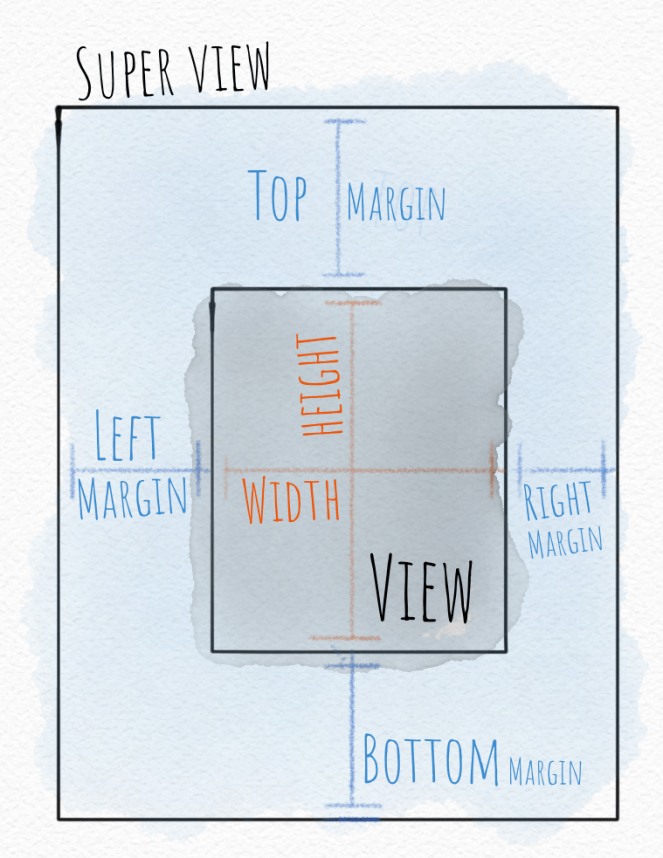
In the days since autoresizing was introduced, more capable layout tools like Auto Layout with constraints and now SwiftUI have been introduced.

But you’ll still see the autoresizing “mask” (an old-school programming term) hiding out in the Size Inspector in Xcode under the View section. If you wondered what that was, now you know.

Software Dev

iOS development “at a glance”

Since I’m learning to draw and also reviewing some of the fundamentals of iOS development for work, I’ve decided, for maximum impact, to do both the same time. 🀯

My theory is that boiling down a complex idea into a simple picture will help me (and you) understand that idea better. πŸ™Œ

So I’m starting an “at a glance” series for iOS development.

I’ll be taking concepts from iOS development and presenting them as a simple picture, like a cheat sheet. Even if you’re not a developer, maybe you’ll still find them interesting.

After all: who doesn’t love a picture?

Stay tuned. We’re starting small. First up: old school layout with autoresizing.

Software Dev

Test your SwiftUI views at rocket speeds πŸš€ with ViewInspector πŸ•΅οΈβ€β™‚️

For years, at least in the iOS world, the idea of automatically testing your UI views was considered out of pocket. After all, the UIKit views lived in non-code files such as a storyboard or a – good lord! – a XIB.

Then came Apple’s XCUI framework, which allows for automatic UI test but takes, more or less, forever to run. I’ve seen XCUI test plans run for 3 hours, 6 hours, even 24 hours. It kind of works for a nightly test on a dedicated server, but not in realtime as you code.

But with SwiftUI, you get concise, clean, cross-platform view-layer code and can now test SwiftUI view as, well, code! This mean you can unit test your views 🀯, thanks in particular to the open source ViewInspector framework.

πŸ‘‰ ViewInspector on GitHib

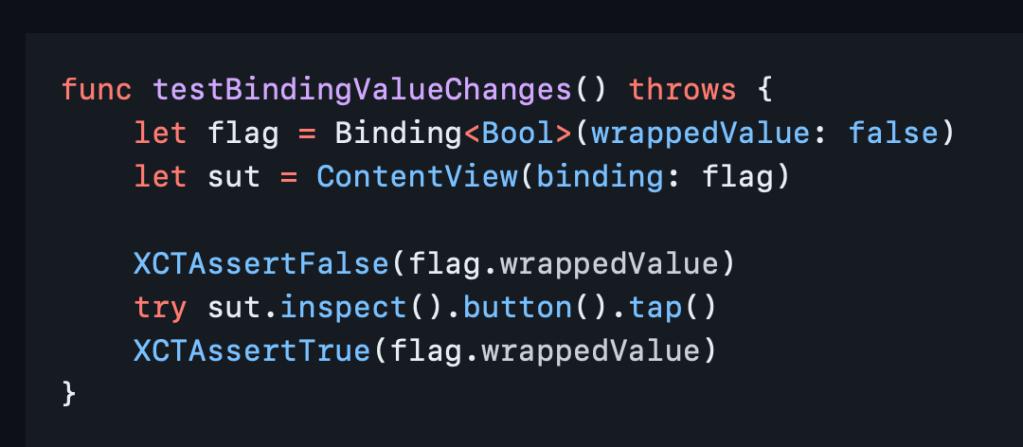
ViewInspector lets you traverse your view hierarchy at runtime, asserting values as you go in traditional unit-test style.

According to the Inspection Guide, ViewInspector supports dynamic testing of @Binding, @ObservedObject, @State, @Environment and @EnvironmentObject. You can even interact with the interface, such as tapping a button and checking the result.

And it all runs in blazing fast unit test speed πŸš€ so your tests don’t have to run all night.

If you still want to do some actual visual testing, consider snapshot testing or mix in some limited XCUI tests for the right balance.

Now you can go write something cool and iterate fast. Thank you, nalexn, for this great tool. πŸ™