Looking back, it’s interesting to appreciate the various Swift advancements that allowed SwiftUI to be created: namely opaque return types, property wrappers, and result builders.
In particular, I’ve been appreciating result builders lately. They’re a useful, general-purpose feature on their own terms. I just created a cache-key builder at work which greatly simplified some pretty ugly and bug-prone logic for createing a cache key string.
I’ve seen a couple even more interesting result builds recently too.
👉 RequestDL, which simplifies the creation of network requests
👉 TextBuilder, which streamlines the creation of complex Text values
These are just two examples I’ve seen on iOS Dev Weekly once or twice, although I’m sure there are plenty more result builders out there to play with.
The video provides the bigger picture of how SwiftUI works with great analogies to the real world for better understanding.
I thought I’d give this video the super summary treatment to boil it down the most ideas that you can absorb at a quick glance. Refer to the full video 👆 for more info.
SwiftUI tracks three main concepts on a view
Identity
Lifetime and state
Dependencies
Identity
Identity is how SwiftUI recognizes distinct elements throughout the view’s lifetime.
Identifiers should be stable and unique; it acts like a key. Multiple views cannot share the same identifier.
Choosing a good identifier is your opportunity to control the lifetime of your view and data.
Types of identifiers
Explicit identifiers are like a dog name and are set with the id parameter. An explicit id is helpful if you want to refer to the view from other views.
Implied identifiers are an inherent identity based on the view’s structure, represented as if statements and other conditions in SwiftUI.
Lifetime and state
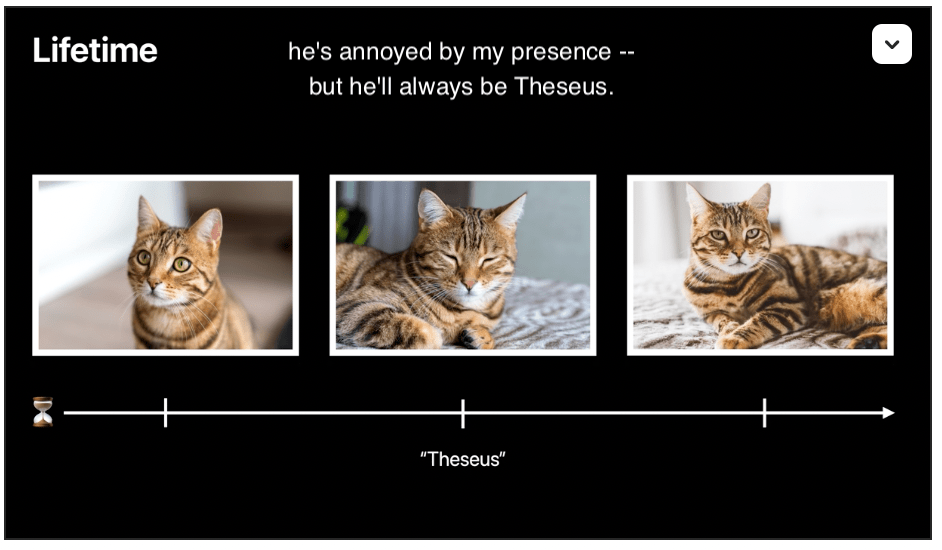
Lifetime tracks an existing view’s data over time. For example: the same cat (per identity) can be awake, asleep, annoyed, hungry, etc. over time.
Whenever identity changes, the state is replaced.
Dependencies
Dependencies are how SwiftUI understands when your UI needs to be updated.
Dependencies are the vars on the view, ie. Binding, State, Environment, ObservableObject, etc.
These data elements combine to create a dependency graph that SwiftUI uses to trigger view updates.
Tip
Inert modifiers are cheap and encouraged over branches (structurally different, separate implied identifier).
Okay, just for fun, this dude put all his modern tools in an old-school macOS 9 style.
How would have the same workflow looked like with the tools of today and the limitations of yesterday. Unreliable internet, little disk storage, macOS 9 and much more.
I have published a post or two about the powers of brevity. But we programmers sometimes take it too far.
Can someone tell me what these integers represent?
case upc(Int, Int, Int, Int)
No? Me either.
This is how associated values are pretty much always done in Swift. But thanks to this post by Marco Eidinger via iOS Dev Weekly, I discovered something new and clarifying: it turns out that you can actually label your enum’s associated values too. People just don’t do it for some reason. 🤷🏻♂️
Can you tell me what the integers represent now?
case upc(numberSystem: Int, manufacturer: Int, product: Int, check: Int)
Isn’t that a little easier to understand?
I run into the assumption sometimes where people mistake brevity for efficiency. Brevity shouldn’t mean sacrificing valuable context for slightly fewer words. Thanks to the Marco Eidinger post for pointing this out explicitly. 👍







 Mental Break Town