
Kicking off the iOS development “at a glance” series, we’ll start pretty basic: autoresizing.
Autoresizing was Apple’s first shot in the days of yore (iOS 2, circa 2011) at letting early iPhone views rearrange themselves (this is the “auto” part) in response to screen rotations. It was limited and clumsy, as was pretty much all of iOS at the time. Mail, contacts, calendars, and the App Store were new features on the iPhone.
So autoresizing makes for a fitting intro to this series.
Autoresizing allows the developer to specify how one view relates to its super-view as far as its size and margins, and which parts are are flexible vs. fixed.
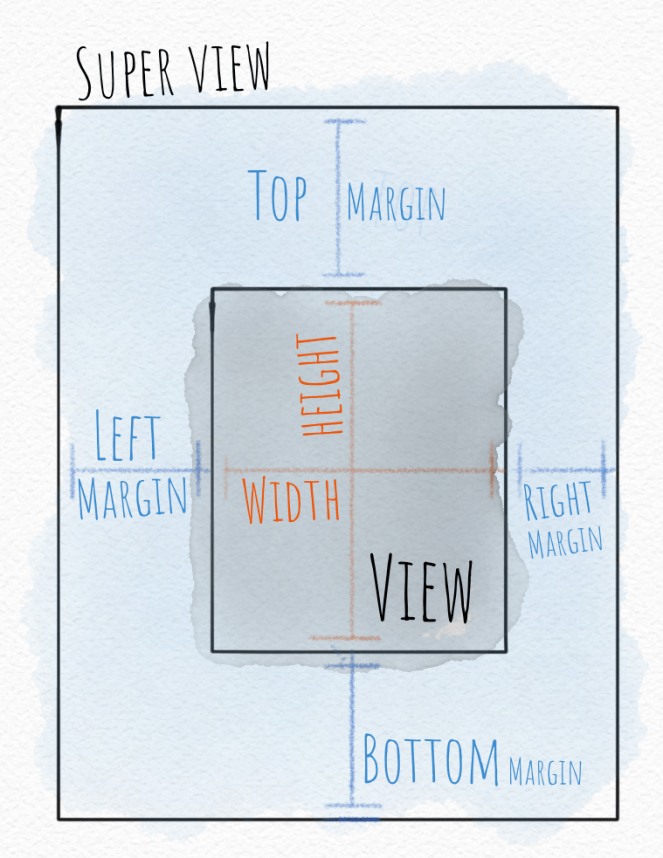
In the days since autoresizing was introduced, more capable layout tools like Auto Layout with constraints and now SwiftUI have been introduced.
But you’ll still see the autoresizing “mask” (an old-school programming term) hiding out in the Size Inspector in Xcode under the View section. If you wondered what that was, now you know.

 Mental Break Town