
Software Dev

Test your SwiftUI views at rocket speeds 🚀 with ViewInspector 🕵️‍♂️

For years, at least in the iOS world, the idea of automatically testing your UI views was considered out of pocket. After all, the UIKit views lived in non-code files such as a storyboard or a – good lord! – a XIB.

Then came Apple’s XCUI framework, which allows for automatic UI test but takes, more or less, forever to run. I’ve seen XCUI test plans run for 3 hours, 6 hours, even 24 hours. It kind of works for a nightly test on a dedicated server, but not in realtime as you code.

But with SwiftUI, you get concise, clean, cross-platform view-layer code and can now test SwiftUI view as, well, code! This mean you can unit test your views 🤯, thanks in particular to the open source ViewInspector framework.

👉 ViewInspector on GitHib

ViewInspector lets you traverse your view hierarchy at runtime, asserting values as you go in traditional unit-test style.

According to the Inspection Guide, ViewInspector supports dynamic testing of @Binding, @ObservedObject, @State, @Environment and @EnvironmentObject. You can even interact with the interface, such as tapping a button and checking the result.
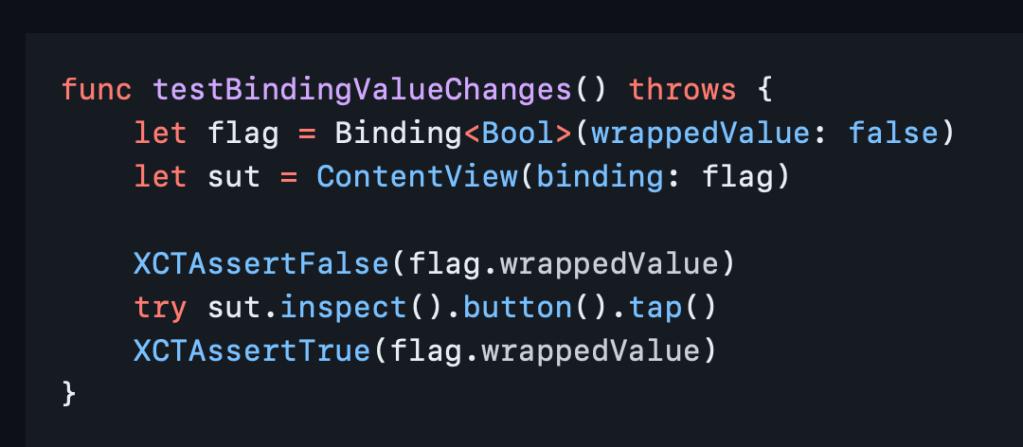
And it all runs in blazing fast unit test speed 🚀 so your tests don’t have to run all night.

If you still want to do some actual visual testing, consider snapshot testing or mix in some limited XCUI tests for the right balance.

Now you can go write something cool and iterate fast. Thank you, nalexn, for this great tool. 🙏
Software Dev

Automatically resolve Xcode project file conflicts

Xcode project files are complex and not meant to be human-readable, so they can be scary to merge. When there’s a conflict, it’s never fun.

The tool Kintsugi intends to automatically solve these conflicts for you “99.9% of the time.”

👉Automatically merging conflicts in Xcode project files | github

The name Kintsugi (金継ぎ) is well-chosen, meaning “the art of repairing broken pottery by mending it with gold.” 🤯

Another interesting note: this project relies on a framework called Xcodeproj that lets you create and modify Xcode project files automatically. That sounds likes a better alternative than a homespun shell script. 👍

via iOS Dev Weekly

Software Dev

It’s Time for Snapshot Testing

I love the idea of snapshot testing. It’s a simple way to automatically test an app’s UI.

It works like this:

  1. Set the app up in a certain state and take a screenshot. Save the screenshot. 📸
  2. Next time when you run the same test, you compare screenshots. 📷 📸
  3. If something changed unexpectedly, then you know there’s trouble. 💥

Here’s a nice series about how to do it for iOS/ Xcode.

👉 Snapshot Testing. Testing the UI and Beyond (Part 1)

And GitHub: swift-snapshot-testing

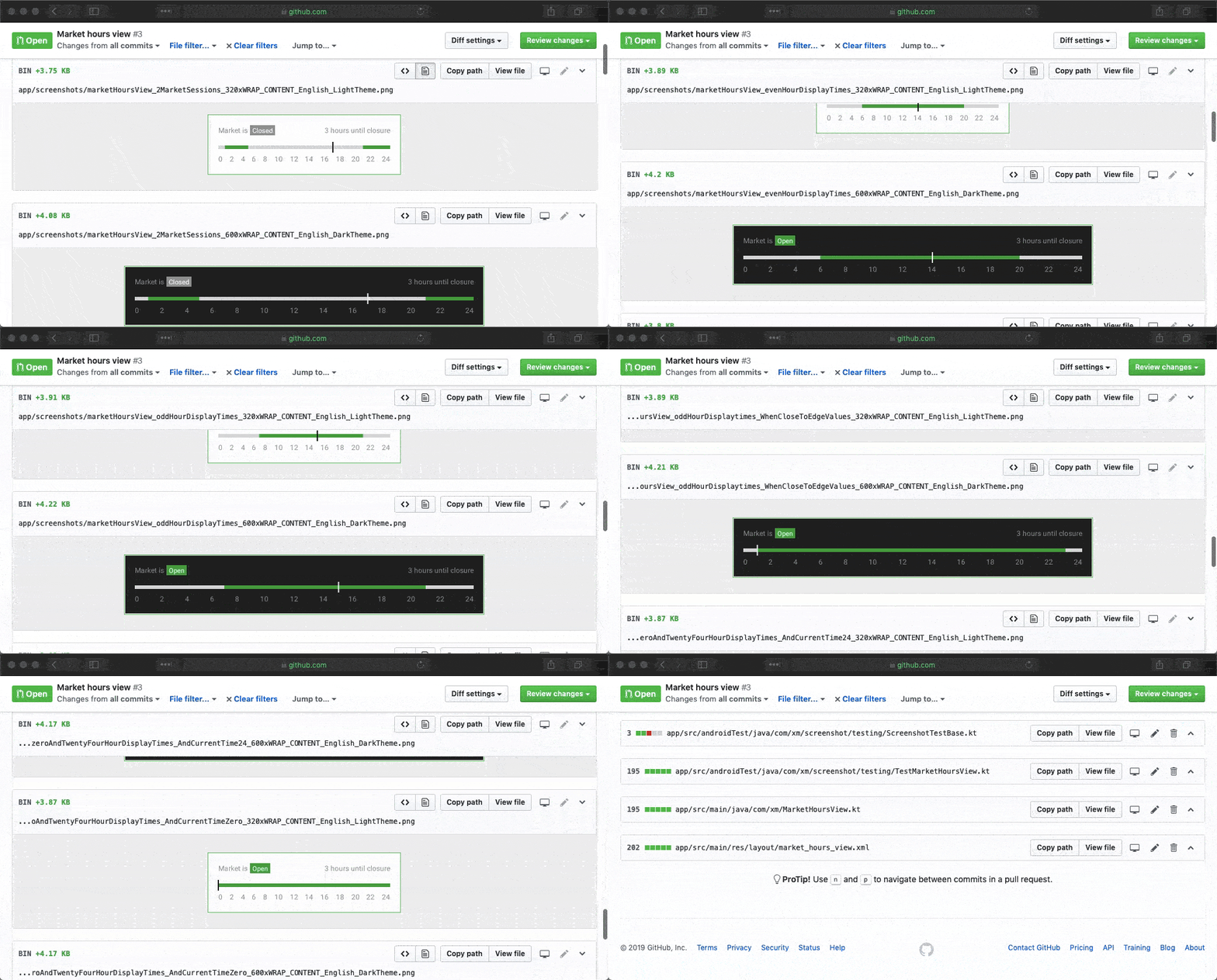
The coolest thing is that you actually upload your screenshots in any new pull requests, so you can literally see what the change is all about (“The perfect pull request”). 🤯

Image for post

Via iOS Dev Weekly.

Software Dev

Uber’s Piranha Eats Your Stale Code

Feature flags are a great way to selectively introduce new features. it allows you to experiment and commit incrementally.

The only down-side to feature flags all the extra code, and in particular going back later together rid of all the crusty flag code flagging you feature on or off. This kind of tech debt can really pile up over time.

Apparently Uber uses feature flags in the thousands and without remorse. So they came up with this automatic way to wipe out your stale, disabled code. Perfect name, too!

👉 Introducing Piranha: An Open Source Tool to Automatically Delete Stale Code | on GitHub

Via iOS Dev Weekly. See also: The Mother of All Feature Flagging Systems for iOS