
For years, at least in the iOS world, the idea of automatically testing your UI views was considered out of pocket. After all, the UIKit views lived in non-code files such as a storyboard or a – good lord! – a XIB.
Then came Apple’s XCUI framework, which allows for automatic UI test but takes, more or less, forever to run. I’ve seen XCUI test plans run for 3 hours, 6 hours, even 24 hours. It kind of works for a nightly test on a dedicated server, but not in realtime as you code.
But with SwiftUI, you get concise, clean, cross-platform view-layer code and can now test SwiftUI view as, well, code! This mean you can unit test your views 🤯, thanks in particular to the open source ViewInspector framework.
ViewInspector lets you traverse your view hierarchy at runtime, asserting values as you go in traditional unit-test style.
According to the Inspection Guide, ViewInspector supports dynamic testing of @Binding, @ObservedObject, @State, @Environment and @EnvironmentObject. You can even interact with the interface, such as tapping a button and checking the result.
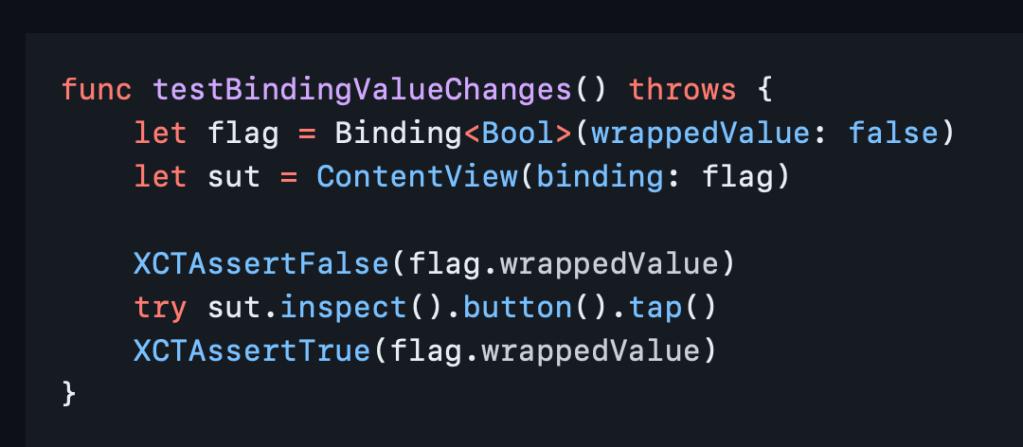
And it all runs in blazing fast unit test speed 🚀 so your tests don’t have to run all night.
If you still want to do some actual visual testing, consider snapshot testing or mix in some limited XCUI tests for the right balance.
Now you can go write something cool and iterate fast. Thank you, nalexn, for this great tool. 🙏


 Mental Break Town