
Xcode has always offered a plentitude of ways to jump around with keyboard shortcuts. Xcode 12 has a new system. Here’s a primer.
👉 Navigating Xcode 12 and Tabs
Via iOS Dev Weekly.
Xcode has always offered a plentitude of ways to jump around with keyboard shortcuts. Xcode 12 has a new system. Here’s a primer.
👉 Navigating Xcode 12 and Tabs
Via iOS Dev Weekly.
Here’s a great tip for anyone using Xcode: when you’re going through a list of search results, you can just delete the items you’re not interesting in. 🤯 It’s so weirdly simple and obvious but surprising.
Via iOS Dev Weekly.
Xcode 12 is adding a new metric to objectively track how smoothly your app scrolls. This is kind of cool since scrolling smoothness feels right and is a sign of a good design.
Via iOS Dev Weekly.
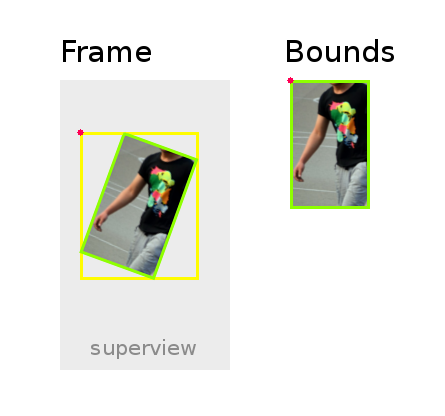
Frames and bounds are a really core concept in iOS development. They are both just rectangles in different coordinate systems. Simple, right? Well, not always. 🤦🏻♂️
If you ever still get lost on frames vs. bounds in iOS development, here’s a good quick summary.
And here’s a good example of how a transform can affect the frame and bounds differently, via iOS Dev Weekly.
👉 CGAffineTransform and Auto Layout
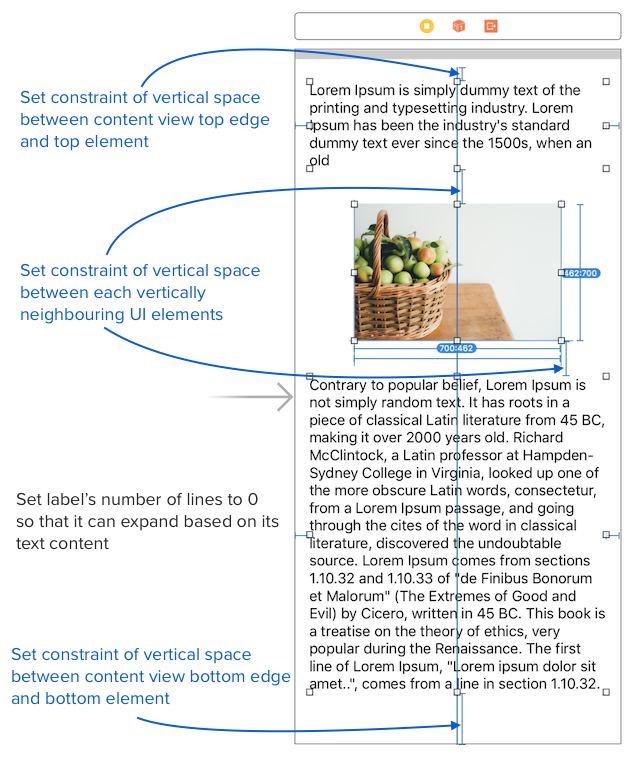
There are a couple of tricks to getting your scroll view working in an Xcode storyboard. The great fluffy.es blog carefully walks you through it. 👍
👉 How to use scroll view in Interface Builder / Storyboard (Xcode 11)
This site also has some really helpful notes on intrinsic size. And a great series on Making Sense of Auto Layout. Who knew? This guy is good. He’s giving Ray Wenderlich a run for his money. 😲
 Mental Break Town